
Selecting the best digital signage CMS for your business isn’t only a tech choice; it directly affects branding, productivity, and customer experience. The right platform helps teams update content faster, manage multiple screens, and keep messaging consistent across locations. Choosing the wrong option leads to wasted time, higher expenses, and restricted growth. This guide explains what makes a digital signage CMS unique and the technical factors you should evaluate before investing, so you can make a confident, future-ready decision that supports everyday operations and long-term business goals while ensuring your screens stay impactful, flexible, secure, and aligned with real customer needs every day.
Table of Contents
What Is Unique About Digital Signage CMS?
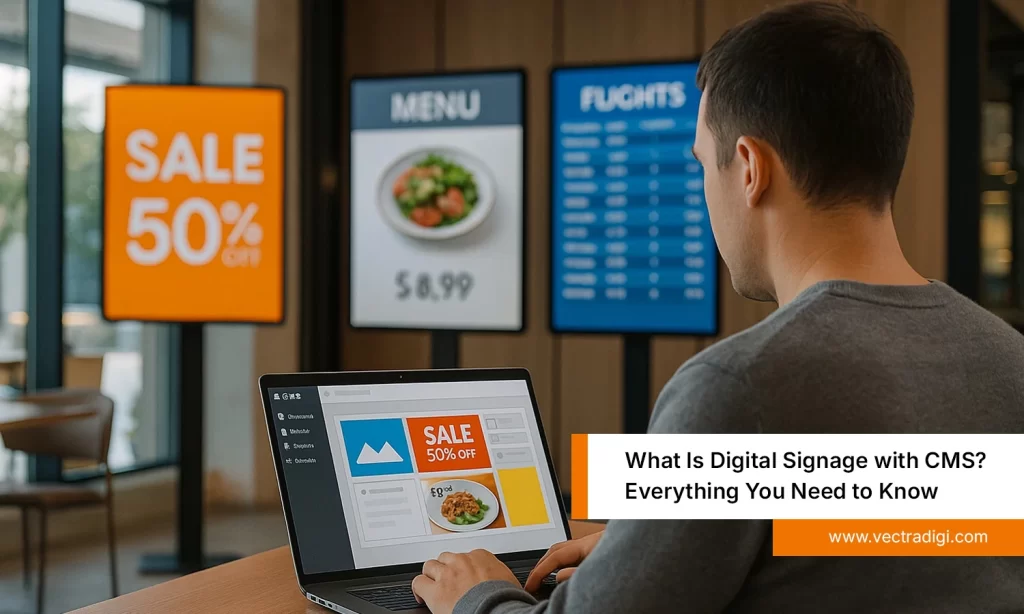
A digital signage CMS is different from a regular content management system because it is designed specifically for managing screens in real-world environments such as retail stores, offices, hospitals, schools, hotels, and restaurants. It allows you to control multiple displays from one dashboard, schedule content, push real-time updates, and deliver multimedia visuals without manual effort. Unlike traditional tools, a signage CMS focuses on reliability, remote access, offline playback, and automation, so your messages stay consistent and timely across locations. It helps businesses create engaging experiences, reduce operational workload, and maintain a stronger brand presence on every digital screen.
Also Read: What Is Digital Signage with CMS? Everything You Need to Know
Key Technical Factors to Consider
Technical choices determine whether your signage network remains reliable, scalable, and easy to manage as your business grows, so evaluating these factors early prevents costly replacements and operational disruptions later.
1. Ease of Use & Dashboard Experience
Ease of use matters because marketing and operations teams work on screens daily. A clear dashboard, drag-and-drop uploads, and role-based permissions reduce training effort and mistakes, letting staff publish updates independently and keep campaigns running smoothly without constant IT involvement or complicated workflows across every location in real-time, and make changes easily.
Real-life example
A retail chain previously depended on one technician for every promotion update, causing delays during seasonal campaigns. After moving to a simpler CMS, store managers updated product visuals themselves, reduced waiting time, and launched offers faster, creating more consistent customer experiences across all outlets throughout busy sales periods every year.
2. Content Scheduling & Automation
Strong scheduling and automation features ensure the right message appears at the right moment. Playlists, recurring timelines, and day-parting reduce manual work, keep campaigns accurate, and help businesses coordinate promotions across locations without logging into each screen whenever content needs to change, saving time and preventing costly human errors daily.
Real-life example
A restaurant franchise once changed prices manually on every menu board, leading to mismatched offers during lunch hours. After adopting automated schedules, breakfast, lunch, and evening menus switched instantly across thirty outlets, reducing confusion, avoiding billing mistakes, and improving consistency for guests during high-traffic periods across the entire network daily.
3. Device Compatibility & Scalability
Device compatibility and scalability let your network grow without replacing hardware. The CMS should support multiple screen sizes, resolutions, media players, and operating systems, so expansions, new branches, or departmental rollouts remain affordable while maintaining consistent content delivery and stable performance across every display in the organization for years ahead.
Real-life example
A corporate headquarters began with ten lobby screens and later expanded to dozens across offices and meeting areas. Because their CMS already supported mixed devices, the team added new displays without replacing players, saved investment costs, and scaled smoothly while keeping branding uniform in every workspace across the entire campus.
4. Offline Playback & Reliability
Offline playback and reliability protect communication when networks fail. The CMS should cache scheduled content locally, prevent blank screens, and resume syncing once connectivity returns, ensuring essential messages, safety notices, and customer information continue displaying without interruptions that could harm trust, sales, or operational efficiency during unexpected outage events anywhere.
Real-life example
During routine maintenance, a hospital experienced network downtime across several departments. Because the CMS supported offline playback, wayfinding maps, appointment instructions, and patient updates kept running continuously. Visitors avoided confusion, staff communication remained smooth, and critical information stayed visible until the internet connection was fully restored across all affected areas.
5. Security & Access Control
Security and access control prevent unauthorized changes and protect sensitive data. Look for encryption, strong authentication, user roles, and audit logs. These controls create accountability, reduce risks, and ensure only approved team members can publish or modify content across your network, supporting compliance and organizational governance standards at all times.
Real-life example
A financial services company assigned separate permission levels to marketing, IT, and regional managers. Every update required review before publication, and audit logs captured who made each change. The structured controls prevented accidental edits, strengthened security, and protected confidential communications displayed across corporate offices during daily signage operations companywide, safely.
6. Analytics & Performance Insights
Performance analytics give you clarity about which content delivers the best results. A capable CMS reports playback status, uptime, impressions, and engagement indicators, enabling data-driven decisions. With measurable results, teams refine creatives, improve timing, and prioritize messages that deliver a stronger impact instead of relying on assumptions or guesswork across campaigns and screens.
Real-life example
A shopping mall reviewed analytics to compare weekend and weekday campaign visibility across entrances and food-court screens. After spotting higher engagement at specific hours, managers adjusted schedules and redesigned promotions. Partner brands reported better footfall and stronger conversions because messaging aligned more closely with real visitor behavior throughout the season.
7. Customer Support & Vendor Reliability
Reliable customer support and vendor stability are essential for long-term success. Choose providers that offer responsive assistance, training resources, documentation, and clear upgrade paths. A trustworthy partner helps resolve issues quickly, supports deployments, and grows with your business instead of leaving teams unsupported after installation during critical expansion phases, too.
Real-life example
A hotel chain faced deployment challenges when rolling out new lobby displays. The vendor provided hands-on onboarding, remote troubleshooting, and regular training sessions, helping staff overcome setup issues quickly. As operations expanded, the same support team guided upgrades and ensured system reliability across every property for consistent guest experiences worldwide.
Common Mistakes to Avoid
- Choosing a digital signage CMS only because it is cheaper, and later discovering hidden limits in features and performance.
- Ignoring scalability, integrations, or device compatibility makes expansion difficult when the network grows.
- Skipping hands-on demos and not testing real workflows with actual users before implementation.
- Overlooking security, offline playback, or support quality, assuming these factors won’t matter until a problem appears.
- Evaluating brochures instead of real-world usability leads to poor adoption and wasted investment.
- Not involving IT, operations, and marketing teams during evaluation results in decisions that fail practical business needs.
How to Choose a Digital Signage CMS
Choosing the best digital signage CMS starts with understanding your goals, audience, and content requirements. Focus on features that support everyday operations and make screen management simpler for your team. Always request a trial so marketing, IT, and on-site staff can test real workflows before committing to a platform. Compare pricing structures, security practices, integration options, and vendor support instead of looking only at license costs. Also, review scalability, product roadmap, and feedback from similar industries to ensure long-term value. In the end, choose a CMS that delivers:
- Ease of use and reliability.
- Strong security and integrations.
- Scalability and future-ready features.
- Responsive vendor support and measurable ROI.
Conclusion
Choosing the right digital signage CMS is not just a technology decision, it is a strategic step toward improving communication, branding, and operational efficiency across your business locations. A well-selected platform helps teams manage content easily, automate schedules, scale displays confidently, and maintain security without extra effort. By evaluating usability, integrations, reliability, analytics, and vendor support, you ensure your network remains future-ready and aligned with real business goals. With the right CMS in place, your digital screens become smarter, more engaging, and more impactful, helping your organization deliver consistent experiences and stronger customer connections every single day.
Ready to upgrade your digital signage experience? Choose a smarter, flexible, and scalable CMS that supports real growth. Explore powerful, business-ready digital signage solutions with Vectradigi and transform your screens into meaningful communication assets.